Ratibi card Salary Check Guide for Salary Card Users
Checking your Ratibi card Salary Check is simple when you use the official prepaid systems provided by First Abu Dhabi Bank (FAB). Ratibi cards are prepaid salary cards, and their balance is managed differently from regular bank accounts.
The PPC Inquiry Portal is the primary and recommended method to check your Ratibi balance online. It works without the FAB mobile app or online banking login and is designed specifically for prepaid salary cards like Ratibi.
This guide explains only the verified and safe ways to check your FAB Ratibi card balance, focusing on accuracy and speed for users in the UAE.
Tip: For the fastest result, start with the PPC Inquiry (online) or an FAB ATM, as both work reliably for most Ratibi cards.
How Can I Do My FAB Ratibi Card salary Check?
You can check your FAB Ratibi card balance in simple ways: online through the PPC Inquiry (Magnati) portal, by SMS from your registered mobile number, or at any FAB ATM. These methods work without a bank account and are used daily by Ratibi salary card holders across the UAE.
Each option is safe and official. If one method doesn’t work, try the next—it usually solves the issue.
What Is the FAB Ratibi Salary Card?
The FAB Ratibi salary balance check is used by employees in the UAE who receive their salary but do not have a full bank account. It is issued by First Abu Dhabi Bank and works as a prepaid salary card.
Who Uses the Ratibi Card?
- Workers paid monthly salaries
- Employees whose companies use payroll cards
- People without savings or current bank accounts
Why the Ratibi Card Exists
The Ratibi card allows employers to pay salaries safely and on time, while employees can withdraw cash, check balances, and make basic payments without opening a bank account.
Why Balance Checking Is Different from a Normal Debit Card
Unlike a normal debit card:
- You may not have full mobile app access
- Some online banking features are limited
- Balance checks depend on PPC inquiry, SMS, or ATMs
This is why many Ratibi users check balance in different ways compared to standard FAB debit card holders.
How FAB Ratibi Card Balance Checking Works
FAB Ratibi card works differently from a normal bank debit card.
This is why balance checking sometimes feels different.
How the system works:
Because Ratibi is not a normal bank card:
This explains why:
Understanding this helps you choose the right ratibi card salary check method and avoid confusion.
FAB Ratibi Card salary Check Using PPC Inquiry (Online Method)
This is the most reliable online method for a Ratibi FAB balance check. It works for most salary cards and does not require a mobile app.
What Is PPC Inquiry (Magnati)?
The PPC Inquiry Portal is an official prepaid Ratibi card balance check system used by FAB Ratibi card holders. It allows you to check your balance online using basic card details.
Key points:
- No login or password required
- No mobile app needed
- Works on mobile and desktop browsers
- Built for prepaid and salary cards
Details You Need
Keep these ready:
- Ratibi card number
- Card expiry date
- Your registered mobile number (sometimes required)
No login or bank account is needed.
Exact Steps you follow for ratibi card salary Check.
Step 1: Open the PPC Inquiry page (Magnati).
Step 2: Select Prepaid / Payroll Card.
Step 3: Enter your card number and expiry date.
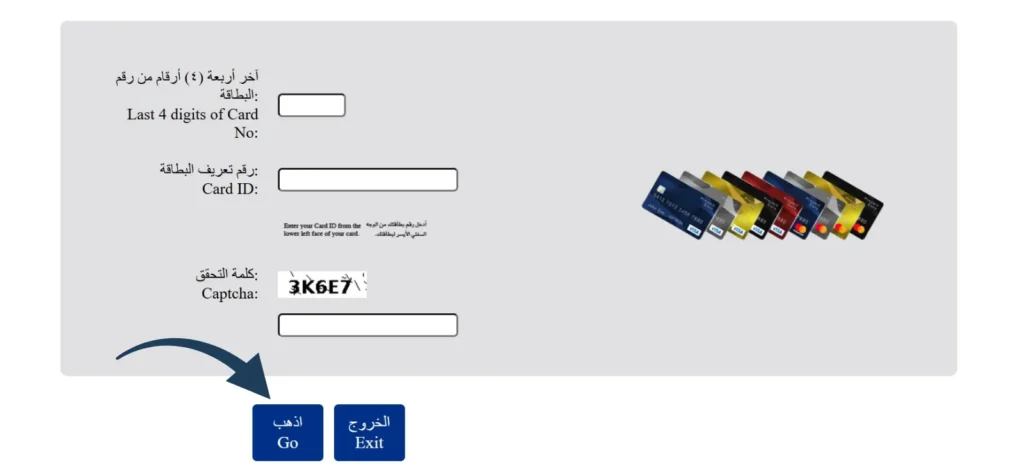
step 4: Submit the details.
step 5: Your current balance shows on the screen.
This method works on both mobile and desktop browsers.
Common PPC Errors and How to Fix Them
What Information You Can See on PPC Inquiry
After submitting your card details, you can usually see:
- Current available balance
- Recent salary credit or transactions
- Card status (active or restricted)
This helps confirm whether your salary has been credited or is still being processed.
Why PPC Inquiry Is Best for Ratibi Users
PPC inquiry is the preferred method for most FAB Ratibi card holders because:
- It is designed specifically for prepaid salary cards
- It works even if you don’t have mobile app access
- It is usually faster than SMS on salary days
- It shows fewer errors compared to other online options
For these reasons, PPC inquiry should always be your first choice for a ratibi card salary check. If PPC inquiry is temporarily unavailable, you can use SMS or an FAB ATM as backup options.
✔ This is the primary online option
✔ Used widely for Ratibi card salary check online
Alternative Ways to Checking your FAB Ratibi Card salary check When PPC (Magnati) Is Not Working
If the PPC inquiry system is temporarily unavailable due to maintenance or heavy traffic on salary days, don’t worry your salary is safe. You can still check your FAB Ratibi card balance using the alternative methods below.
Each option works in a different situation. Use the one that fits what you have available right now (internet, registered mobile number, or ATM access).
| Method | Best When | Internet Needed | Important Note |
|---|---|---|---|
| SMS Balance Check | You don’t have internet | ❌ No | Mobile number must be registered |
| FAB ATM | You need instant confirmation | ❌ No | FAB ATMs are most reliable |
| Mobile Apps (FAB / Payit) | Your card supports app access | ✅ Yes | Not all Ratibi cards are eligible |
If one method doesn’t work, try the next. This is normal for Ratibi salary cards and does not mean your salary is missing.
FAB Ratibi Card Balance Check via SMS (Alternative)
SMS balance check works only if SMS banking is activated and your mobile number is registered with FAB. It works on basic phones and does not require internet access.
Exact SMS Format
Type this message:
BAL XXXX
(Replace XXXX with the last 4 digits of your FAB account or Ratibi card number)
Send it to:
2121
Send SMS From Which Number?
- The SMS must be sent only from the mobile number registered with your FAB Ratibi card.
- If you send it from another number, you will not receive the balance.
When SMS Balance Check Fails
SMS may not work if:
- Your mobile number is not registered
- Your phone has no network signal
- The SMS service is temporarily busy
- The card is blocked or expired
If SMS does not work, try PPC Inquiry (online) or visit an FAB ATM.
Are There Any Charges?
- FAB may charge a small SMS fee based on your mobile operator.
- The fee is usually minimal and shown in your transaction history.
FAB Ratibi Card salary Check at ATM (Alternative)
Checking your Ratibi balance at an ATM is simple and works even if online or SMS options fail.
FAB ATM Steps
- Insert your Ratibi card into the ATM.
- Enter your PIN.
- Select Balance Enquiry.
- Your balance will appear on the screen.
- You can also print a mini slip if available.
FAB ATMs are the most reliable option for Ratibi users and are operated by First Abu Dhabi Bank.
Using Other UAE ATMs
- You can use some non-FAB ATMs, but results may vary.
- Balance enquiry may work, but errors are more common.
- Not all ATMs support Ratibi prepaid cards.
If another ATM shows an error, try a FAB ATM instead.
Fees Explained Honestly
- FAB ATM balance check: usually free
- Other bank ATMs: may charge a small fee
- The fee (if any) is shown on the screen before you confirm
ATM balance check is a good choice when:
- SMS is not working
- PPC inquiry is slow
- You want an instant, clear result
Ratibi card salary Check via FAB Mobile App (Alternative)
Many users search for a fab ratibi card salary check inside the FAB mobile app, but this method does not work for everyone. Here’s the clear truth.
Who Is Eligible to Use the FAB Mobile App?
- Ratibi card holders linked to a full FAB bank profile
- Users whose employer enabled app access
- Cards with verified mobile number and ID
If your Ratibi card is standalone (payroll-only), app access is often limited.
Why Many Ratibi Users Cannot Log In
Most login problems happen because:
- Ratibi card is not a full bank account
- App asks for Customer ID, which many users don’t have
- Card is issued only for salary, not banking
- Mobile number is not properly linked
This is common and not a card problem.
When the App Works and When It Doesn’t
App may work if:
- You already use FAB banking services
- Your Ratibi card is connected to your profile
App will not work if:
- Your card is salary-only
- You never registered for online banking
- Your employer manages the card fully
Ratibi Card Balance Check Using Payit App (Alternative)
The Payit app can be used by some Ratibi card holders, but it’s not for everyone. This section explains when it helps—and when it doesn’t.
Who Should Use Payit
- Ratibi users who want a wallet style app
- Users who can complete Payit verification
- People who plan to store or move small amounts digitally
Payit is a digital wallet by Payit and works separately from FAB’s main banking app.
Limitations You Should Know
- Not all Ratibi cards can be linked
- Verification may take time
- App features are limited for salary-only cards
- Balance may not update instantly after salary credit
If Payit doesn’t link your card, this is normal. Use PPC Inquiry, SMS, or an FAB ATM instead.
Payit App vs FAB Mobile App (Quick Comparison)
- Payit: wallet-based, works for some Ratibi users, limited features
- FAB App: banking-focused, works only if your Ratibi card is linked to a bank profile
If your goal is only to check balance, Payit is optional. PPC Inquiry and ATM remain the most reliable options for most users.
Best & Fastest Way to Check Ratibi Card Balance (Comparison)
The best method depends on speed, access, and what you have available (internet, registered mobile, or ATM).
This quick comparison helps you decide in seconds.
| Method | Speed | What You Need | Fees |
| Online (PPC Inquiry – Magnati) | Very fast | Card number + expiry date | Free |
| SMS Balance Check | Fast | Registered mobile number | Small SMS charge |
| FAB ATM | Instant | Card + PIN | Usually free at FAB ATM |
Why Your Ratibi Card salary check May Not Show (Problems & Fixes)
If your ratibi check balance is not working, don’t panic. These issues are common and usually easy to fix. Below are the real problems users face and exactly what to do in each case.
Salary Credited but Balance Shows Zero
Why this happens:
- Salary was processed but not fully posted yet
- Employer submitted salary late
- WPS processing delay (very common on weekends)
What to do:
- Wait a few hours and check again
- Try an FAB ATM instead of online
- If balance still shows zero after 24 hours, contact your employer’s HR first
ATM Says “Transaction Not Allowed”
Why this happens:
- ATM does not support prepaid salary cards
- Temporary system issue
- Card usage is restricted outside FAB ATMs
What to do:
- Use an FAB ATM only
- Reinsert card and retry
- If error continues, the card may be restricted—contact First Abu Dhabi Bank support
PPC Inquiry Shows Error or No Balance
Why this happens:
- Incorrect card number or expiry date
- Portal busy on salary days
- Card details not updated yet
What to do:
- Double-check card details
- Refresh and try again after a few minutes
- Use SMS or ATM if PPC keeps failing
SMS Balance Not Received
Why this happens:
- Mobile number is not registered
- SMS sent from a different number
- Network issue or SMS service delay
What to do:
- Send SMS only from your registered number
- Check mobile signal and retry
- If SMS never works, register your number or use an ATM
Card Is Blocked or Expired
Why this happens:
- Card expired
- Too many wrong PIN attempts
- Security block due to inactivity
What to do:
- Visit an FAB branch or call customer support
- Carry your ID and card
- Employer may need to request a replacement card
Important Note
Most balance issues are timing or access-related, not salary problems. Always try ATM → Online → SMS in that order if one method fails.
This section exists to save you time and reduce stress—nothing more.
How to Register or Update Mobile Number for Ratibi Card
A registered mobile number is important for SMS balance checks and some online verifications. If your number is not linked, SMS and PPC checks may fail.
Below are only the methods that affect balance checking.
Register or Update Mobile Number via FAB Mobile App
This works only if your Ratibi card is linked to a FAB banking profile.
What to know:
- Many Ratibi users cannot access the app
- If the app lets you log in, you can update your number there
- Changes may take some time to reflect
If you can’t log in, use the next options.
Register via FAB Online Banking
This option is for users who already have:
- FAB online banking access
- A Customer ID
If your Ratibi card is salary only, this method usually won’t work.
Register or Update via Employer (Most Common)
This is the most reliable method for Ratibi users.
How it works:
- Contact your company’s HR or payroll team
- They submit the mobile number update request
- The change is processed through First Abu Dhabi Bank
Most SMS balance issues are fixed this way.
Why Mobile Number Registration Matters
- Required for SMS balance check
- Needed for some online verifications
- Helps with card security alerts
If SMS balance check is not important for you, you can still check balance using an FAB ATM without any mobile registration.
Fees & Charges Related to Balance Checking
Most users worry about hidden charges when doing a ratibi fab balance check. Here is the clear truth, without confusion.
ATM Balance Inquiry Charges
- FAB ATM: Balance enquiry is usually free
- Other bank ATMs: A small fee may apply
- If a fee applies, it is shown on the screen before you confirm
To avoid charges, always use an FAB ATM when possible.
SMS Balance Check Charges
- SMS balance check may have a small charge
- The exact cost depends on your mobile network
- The charge (if any) is deducted automatically
The fee is usually very low, but if you want a completely free option, use PPC Inquiry (online) or an FAB ATM.
Failed Transaction Charges
- Balance enquiry failures: usually no charge
- ATM transaction errors: fees are rarely applied
- If a charge appears, it will show in your transaction history
Repeated failed attempts can sometimes trigger security checks, so avoid trying many times in a row.
How to Get FAB Ratibi Card Statement
If you need more than just your current balance, you can get a Ratibi card statement showing recent salary credits and transactions. Here are the only practical options related to balance checking.
Get Ratibi Card Statement via PPC Portal
This is the easiest method for most users.
- Use the PPC Inquiry (Magnati) portal
- Enter your card details
- View recent transactions and balance
It works without a bank account and is suitable for most Ratibi salary cards.
Get Statement at an ATM
- Insert your Ratibi card at an FAB ATM
- Select Mini Statement (if available)
- Print or view recent transactions
ATM statements usually show limited entries, not a full history.
Get Statement via Mobile App (If Eligible)
- Works only if your Ratibi card is linked to a FAB banking profile
- Many salary only cards cannot access this option
If the app doesn’t work for you, this is normal. Use PPC or an ATM instead.
Good to Know
For a quick fab ratibi balance check, you don’t need a full statement.
Statements are helpful when you want to:
- Confirm salary credit
- Track recent spending
- Check transaction dates
This section stays focused only on what supports balance checking—nothing extra.
WPS vs Non-WPS Salary Why It Affects Balance Timing
Salary timing is one of the biggest reasons users think their ratibi card salary check is not working. In many cases, the issue is not the card it’s how the salary was sent.
What Is WPS and Non-WPS (Simple Explanation)
- WPS (Wage Protection System): Salary is sent through the UAE salary system and processed in stages.
- Non-WPS: Salary is sent directly without passing through WPS.
Most Ratibi cards receive salaries through WPS, which means processing time matters.
Why Salary Delays Happen
Your balance may not show immediately because:
- WPS processing can take several hours
- Salaries sent before weekends or holidays may be delayed
- Employer submitted the file late in the day
- Bank systems are busy on salary dates
This is very common and happens every month for many users.
What You Should Expect as a User
- Salary may show in PPC or ATM later the same day
- Sometimes it appears the next working day
- Balance delays do not mean salary is missing
If your salary does not show after 24 hours, contact your employer’s HR first. If needed, they can confirm the transfer status with First Abu Dhabi Bank.
This section explains timing only no legal details, no employer theory just what affects your balance and when to check again.
FAB Customer Support (When Nothing Works)
If none of the balance check methods work and the issue does not resolve after some time, it’s okay to contact official support. Make sure you reach out to the right channels so your concern is handled quickly and correctly.
When to Contact FAB
Contact First Abu Dhabi Bank if:
✔️ Your card is blocked or expired
✔️ An ATM shows repeated errors even at FAB ATMs
✔️ PPC inquiry and SMS both fail for more than 24 hours
✔️ Your PIN is locked after multiple wrong attempts
For temporary delays on salary day, especially if the salary was sent hours ago, it’s usually best to wait a few hours before calling support, as processing can take time.
Official FAB Support Contact Details (UAE)
📞 Phone (24/7 Contact Centre – UAE):
- 600 52 5500 : FAB Contact Centre (local UAE number)
- +971 2 681 1511 : International support number
📧 Official Email:
- atyourservice@bankfab.com : FAB customer service enquiries
🌐 Official Support Page:
- https://www.bankfab.com/en-ae/contact-us : Here you can find additional contact options and online forms for inquiries or complaints.
⚠️ Fraud / Security Reporting:
If you receive a suspicious message about your card or account, you can report it to FAB Security:
- Phone: 600 52 5500
- Report fraud email options listed on the FAB Security page
What Details to Keep Ready
Before calling or visiting a branch, have these items ready:
- Your Ratibi card
- Emirates ID (or the ID used during card issuance)
- Registered mobile number
- Approximate salary credit date
This helps support staff identify your case faster and avoid repeat visits.
Employer vs Bank Responsibility (Very Important)
Employer / HR:
- Salary not credited
- Late salary
- Wrong amount
- WPS (Wage Protection System) or Non-WPS delays
FAB (First Abu Dhabi Bank):
- Card issues
- PIN problems
- ATM errors
- Blocked or expired cards
If salary is missing, always contact your employer first. If salary is confirmed but balance still doesn’t show, then contact FAB. This step-by-step approach prevents confusion and helps resolve issues faster.
Conclusion
FAB Ratibi card balance checks work best when you use the systems designed specifically for prepaid salary cards, not regular banking tools. The PPC Inquiry (Magnati) portal remains the most accurate online method, while FAB ATMs and SMS balance checks provide reliable alternatives when internet access or app features are limited.
Most balance-related issues are caused by salary processing time, WPS delays, or access conditions, not missing salary payments. By understanding how the Ratibi system works and choosing the right method at the right time, you can avoid unnecessary stress and get accurate balance information quickly.
This guide is built for FAB Ratibi card holders in the UAE and focuses only on verified, official, and practical methods. Following these steps ensures safe balance checks, clearer troubleshooting, and faster resolution when support is needed.